How to Set Up Linux Apache Server
Page 15: Port Forwarding on Router to Web Server
This is just a basic Internet concept. When two computers use TCP/IP to communicate with each other, they have to specify the destination by using:
- An IP Address, and
- A Port Number
The following are just some commonly used port:
| Service | Port | Description |
| FTP | 21 | File Transfer Protocol |
| SMTP | 25 | Simple Mail Transfer Protocol |
| HTTP | 80 | Hypertext Transfer Protocol |
| POP3 | 110 | Post Office Protocol 3 |
| IMAP | 143 | Internet Message Access Protocol |
In order that your router know where to send the request when receive HTTP from other computers, you must set the port forwarding service on the router as shown in the following diagram.
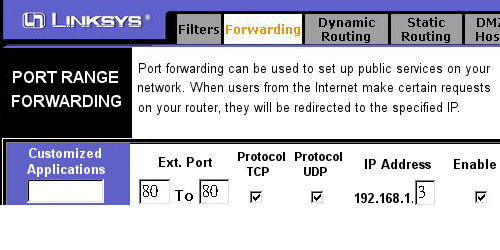
Up to now, all settings on networking are finished. It's time to check the Apache Webserver.
